MailsDaddy OLM to Office 365 Migration
Effortlessly import and migrate Mac Outlook (.olm) files directly into Microsoft 365 (Office 365) and Live Exchange Server. The specialized migration utility preserves complete mailbox structures, email properties, attachments, contacts, and calendar items without requiring manual configuration or data loss.
- Directly import single or multiple Mac OLM files to Office 365 mailboxes.
- Migrate OLM data to Primary Mailbox, In-Place Archive, or Shared Mailboxes.
- Maintain original folder directory hierarchy, email headers, and attachments.
- Compatible with all macOS Outlook editions and modern Windows operating systems.
Certified & Highly Reviewed By Leading Software Authorities
Award-Winning & Recommended by Independent Editors
Suggest Software Review – MailsDaddy OLM to PST Converter
The proficient solution for the Mac Operating System user to export their complete or selected database in Outlook for Windows platform without any hassle. During data conversion, the main activity of the OLM file remains intact in the PST file. After analyzing this utility, we declare it the most reliable, and hassle-free solution. This tool deserves the award from us according to the kind of abilities it has and the satisfaction received by users after working with it.
TopShareWare - OLM to PST Migration Tool
MailsDaddy OLM to PST Converter tool is a riskless way to convert Mac OLM data to PST format. The solution is designed with highly advanced technical methods that provide pleasure to the user to convert multiple OLM data files in PST format. The best part of this OLM converter is that you can move selected data in various file formats without any data loss and alteration.
Features of the OLM to Office 365 Migration
Enterprise-grade recovery and conversion, packed into a simple desktop app — no technical expertise or Exchange server required.
Direct OLM to Microsoft 365 Upload
Securely upload all Mac Outlook mailbox items directly to Office 365 user mailboxes via modern authentication.
Batch OLM Migration Mode
Add multiple OLM files simultaneously and migrate all mailboxes in a single automated process.
Preserve Folder Structure & Metadata
Retains the complete internal mailbox directory hierarchy, To, CC, BCC, Date, Subject, and read/unread flags.
In-Place Archive & Shared Mailbox Support
Choose between primary user mailboxes, archive mailboxes, or shared organization mailboxes during import.
Full Email Attachment Preservation
Every attached file, document, photo, and nested archive is transferred without modification.
Item Preview Before Migration
Inspect emails, contacts, calendars, and notes in the preview pane prior to initiating the cloud migration.
Eye-Catching Features of MailsDaddy OLM to Office 365 Migration software
Zero Data Loss Mac to Cloud Migration
High-speed conversion algorithms process Mac Outlook archives without risk of truncation or header corruption.
- High-speed conversion algorithms process Mac Outlook archives without risk of truncation or header corruption.
- Engineered specifically for optimal zero data loss mac to cloud migration workflows.
- Maintains complete data integrity, folder hierarchy, and email attributes.
Direct Office 365 Modern Authentication
Connects directly to Microsoft 365 using modern OAuth and secure tenant credentials for seamless administrative migration.
- Direct cloud mailbox migration into Office 365 or Live Exchange Server.
- Zero downtime migration preserving full folder trees and meta properties.
- Supports primary mailboxes, archive mailboxes, and custom folder trees.
We Migrate OLM Mailbox Items to Office 365
Every folder hierarchy, email header, embedded attachment, contact attribute, and calendar recurrence is processed with 100% bit-exact fidelity.
Mac Outlook Emails & Metadata
Preserves To, CC, BCC, Date, Subject, and Formatting...
Extracts all emails from Mac Outlook OLM files and migrates them directly to Office 365 mailboxes while preserving all properties.
Supported Elements & Formats:
Convert OLM to OFFICE-365 in 5 Simple Steps
No technical skills needed. Watch each step in the live software interface or click any step below.

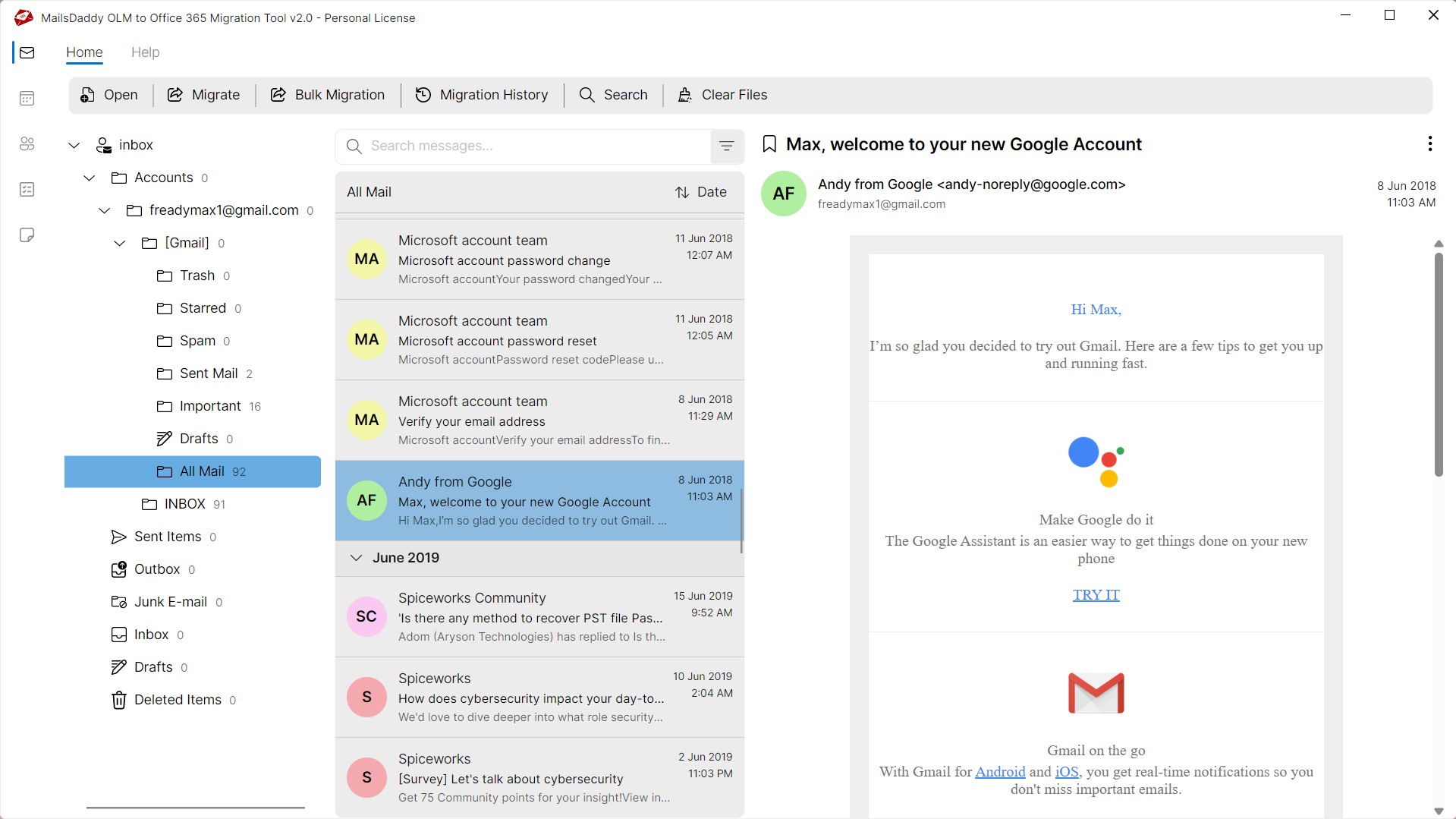
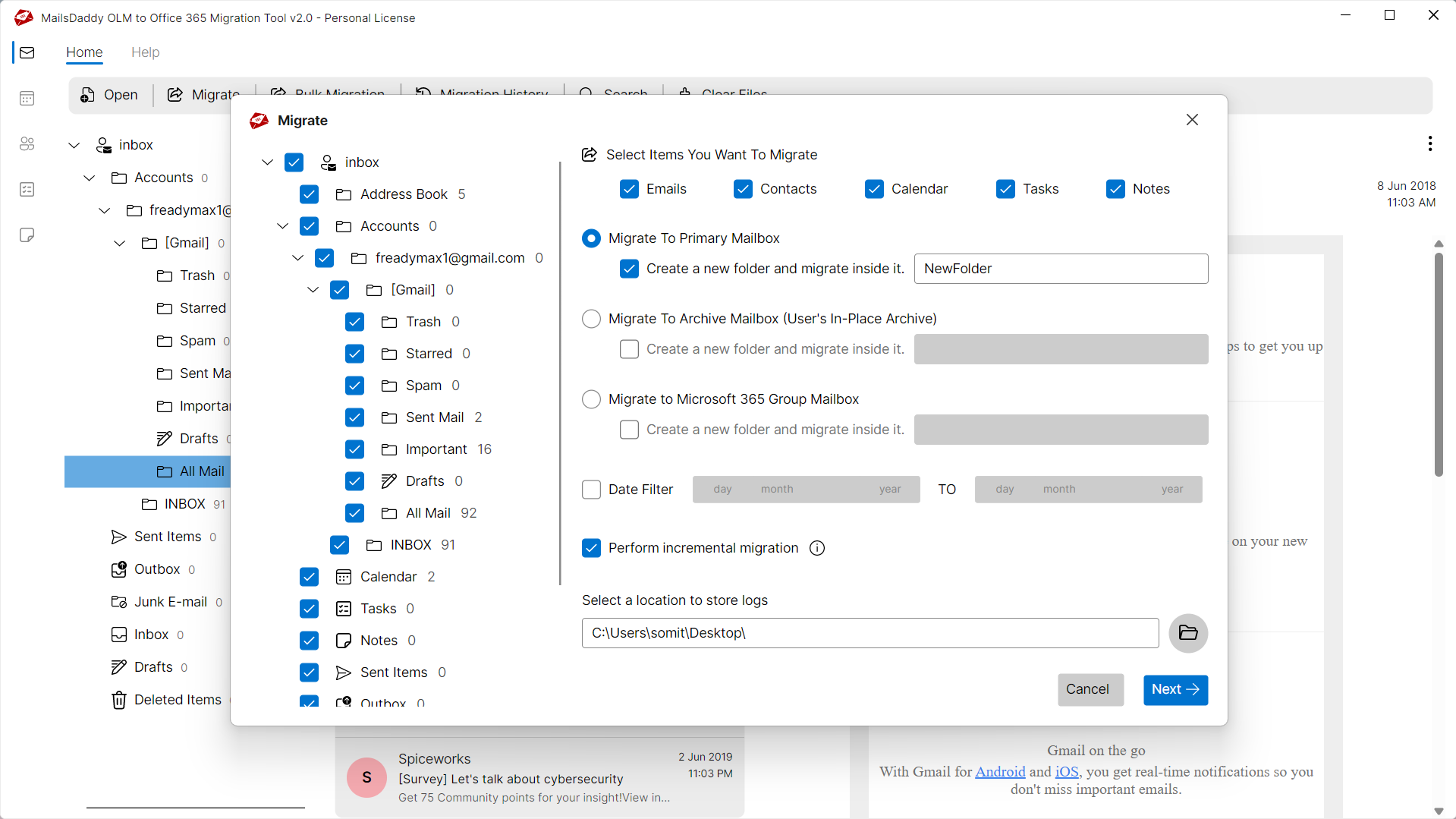
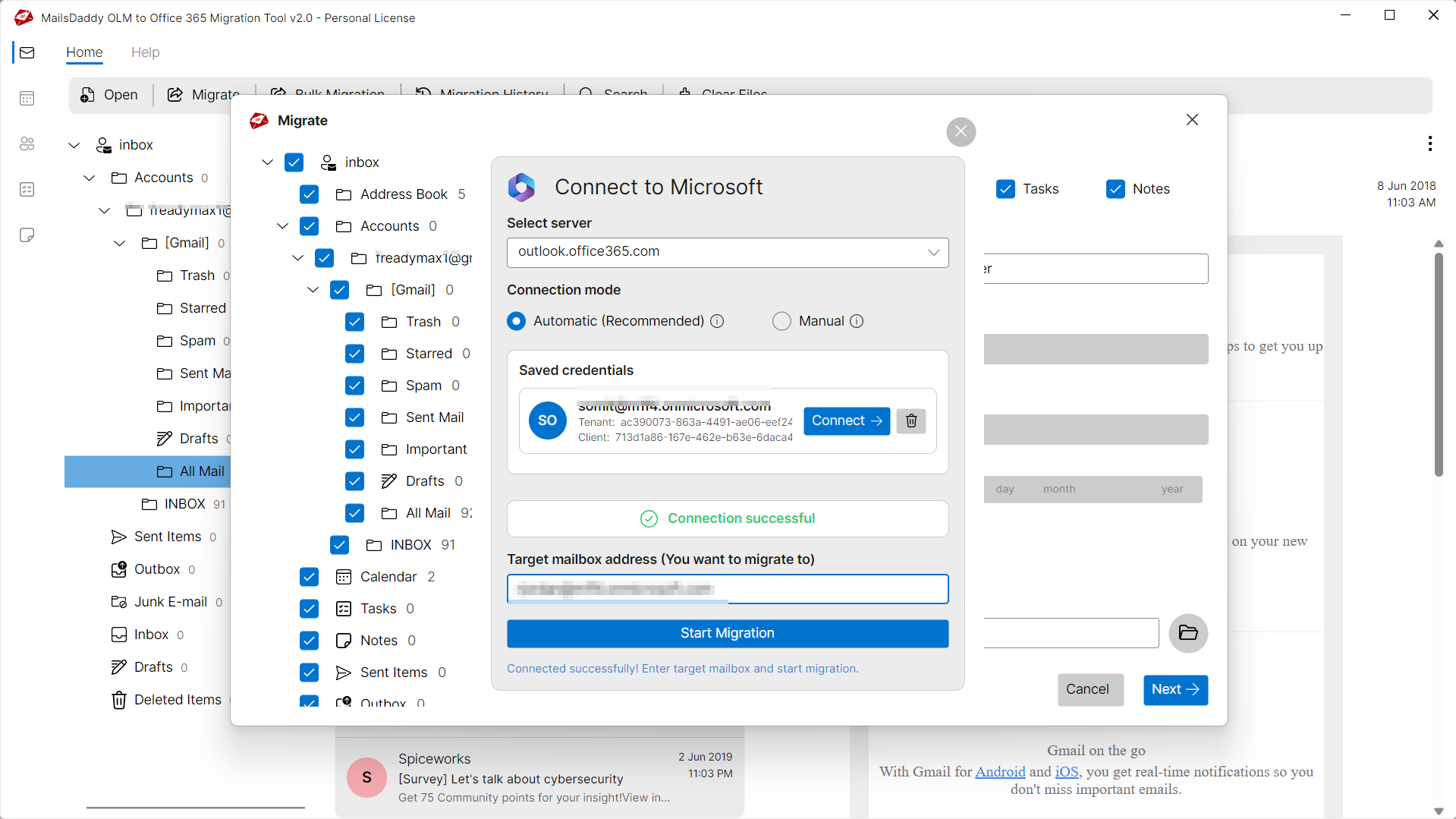
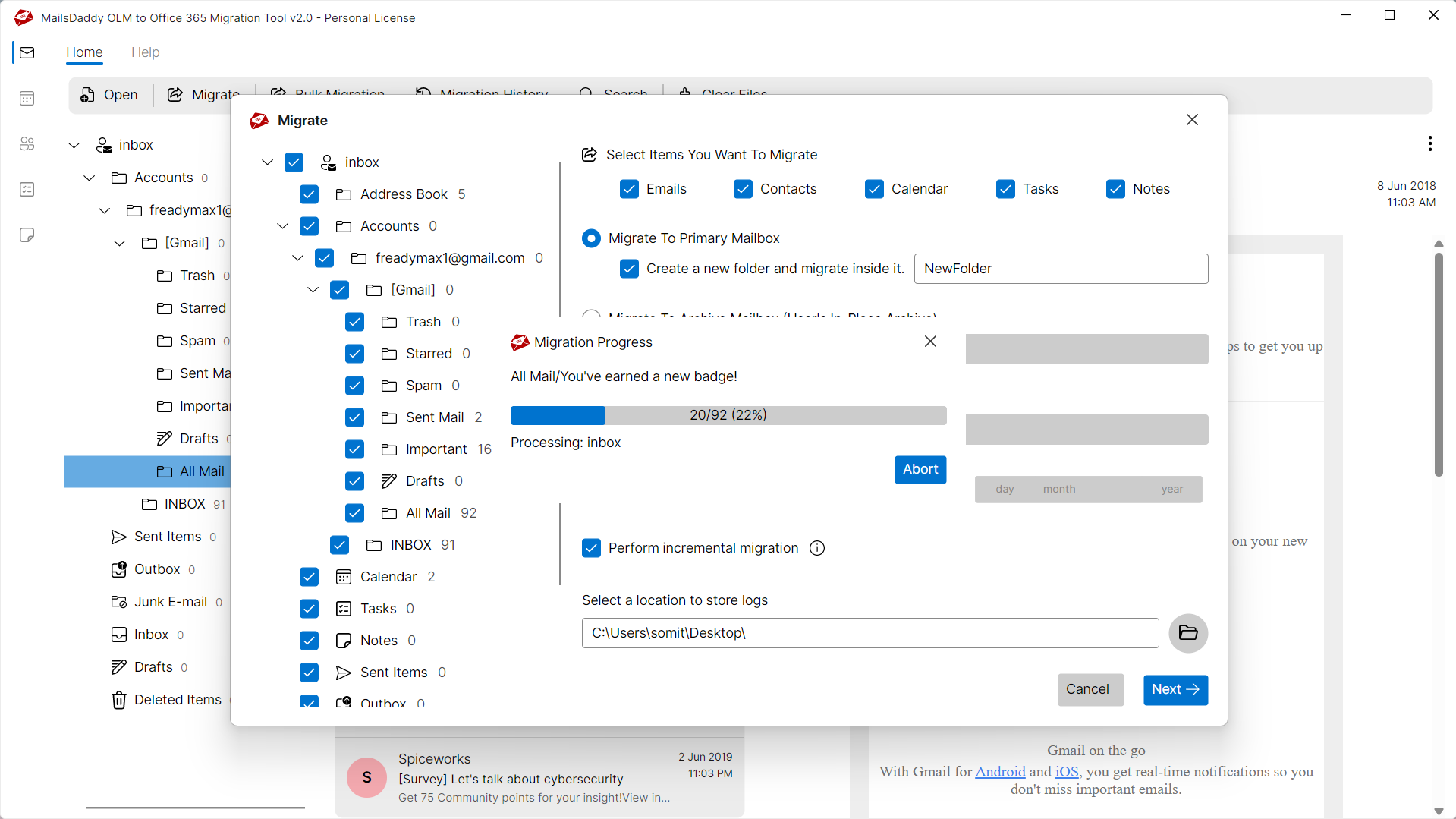
Looking for the complete user manual and working guide?
Explore comprehensive guides for standard PST conversion, search & filter migration, and Live Exchange Server export.
Understanding OLM Files & Why Need Safe Migration
Understanding Cached Exchange Mode, reasons for offline file inaccessibility, and how conversion resolves corruption.
Resolving Common OLM File Issues
Damaged, orphaned, or inaccessible OLM files can prevent users from accessing crucial mailbox messages. MailsDaddy OLM to Office 365 Migration repairs and extracts data from problematic files without modifying original contents.
Common Causes of OLM Corruption
Mailbox files can become unreadable or unstable due to several unexpected environment factors:
Sudden Application Termination
Abrupt power cuts or crashes while writing to OLM files can leave header indexes inconsistent.
Oversized Mailbox Files
Exceeding recommended mailbox capacity can lead to performance degradation and corruption.
Hardware or File System Failure
Bad sectors on the storage drive or network transfer drops can damage database sectors.
Typical OLM Error Messages
If you encounter any errors while accessing your mailboxes, converting with MailsDaddy OLM to Office 365 Migration resolves them immediately:
How OLM to Office 365 Migration Resolves the Problem
By bypassing the native email client's corrupt cache and performing low-level binary reading, OLM to Office 365 Migration extracts all healthy and orphaned items directly into clean OFFICE-365 files.
Technical Specifications
Engineered for lightweight footprint, standalone execution, and broad enterprise compatibility for MailsDaddy OLM to Office 365 Migration.
System Requirements
Full support for Windows Server 2022, 2019, 2016, 2012, 2008 & 2003 (32/64-bit)
Platform Support
Office 365, Microsoft 365, Exchange Online
Supported Formats
OLM (Healthy, Corrupted, Orphaned, Large Archives)
Retains 100% attachments, inline images, headers, and metadata
Preserves complete folder hierarchy, read/unread flags, and timestamps
100% Offline & Private
Zero cloud uploads or telemetry. Processing happens strictly within your local machine.
No Outlook Required
Completely standalone engine. Processes OLM files without requiring host email clients.
No File Size Limits
Tested on massive 50GB, 100GB, and 500GB+ enterprise mailboxes with zero crash.
Full Windows Support
Native execution across Windows 11 down to Windows XP & all Windows Server editions.
Trusted by IT teams and professionals worldwide
Explore our client testimonials to see why users trust and recommend our solutions.
“After using this OLMtoPST tool to convert my Outlook OLM data to PST format, I am happy to thank you. OLM to PST Converter Tool is as mind blowing as the helpful team of Maildaddy Software. This solved all the migration related issues that I was facing before using this tool.”
Jose Rodrigues
“I had a very large OLM file that was not an easy task to convert in Outlook PST format without any data trimming but the MailsDaddy Software team completed it very easily with the same data properties. Thanks for helping me. I appreciate to offering my future data conversion tasks together. Thank you.”
Amanda Keith
“Uiteindelijk was de OLM-naar-PST-conversie een volledig succes vanwege de technische scherpzinnigheid en toewijding van het MailsDaddy-team. Ze waren gewoon uitstekend als hun ontwikkelde conversietools. We zouden niet zo ver zijn gekomen in deze reis zonder hun steun, raad en begeleiding.”
David Bryant
Need Help with OLM to Office 365 Migration?
Our dedicated 24/7 technical team is available to assist you with any migration or recovery challenge.
The free demo version lets you preview all items and export up to 20 emails per folder.
Frequently Asked Questions
Find clear answers regarding the OLM to Office 365 Migration conversion process, file compatibility, and recovery features.
Yes. The MailsDaddy OLM to Office 365 tool connects directly to your Office 365 account and imports OLM mailboxes seamlessly without requiring an intermediate PST conversion.
Start migrating with OLM to Office 365 Migration today.
Download the free trial and inspect your recovered mailbox in minutes.