Simplify your email migration process using the reliable MailsDaddy PST to Zoho Mail Tool for accurate and secure PST import. This tool lets you migrate your data efficiently in both single and bulk modes, allowing users to import multiple PST files into Zoho Mail accounts effortlessly. with advanced features such as date filters, preview the file, and many more, the tool makes the entire process smooth, accurate, and user-friendly.
 See our Reviews on Trustpilot
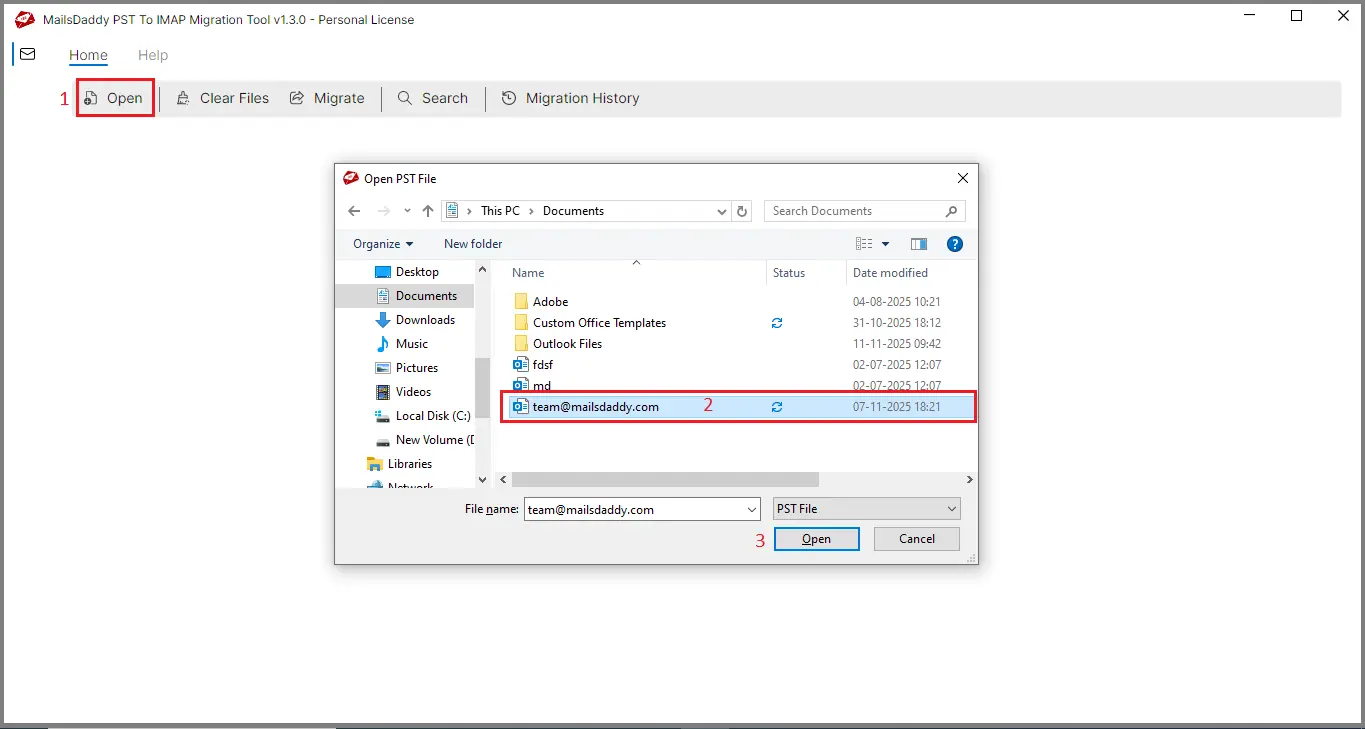
This feature lets you quickly add PST files and perform a deep scan to ensure the data is healthy and ready, enabling a smooth, error-free transition when importing your PST file into Zoho Mail.
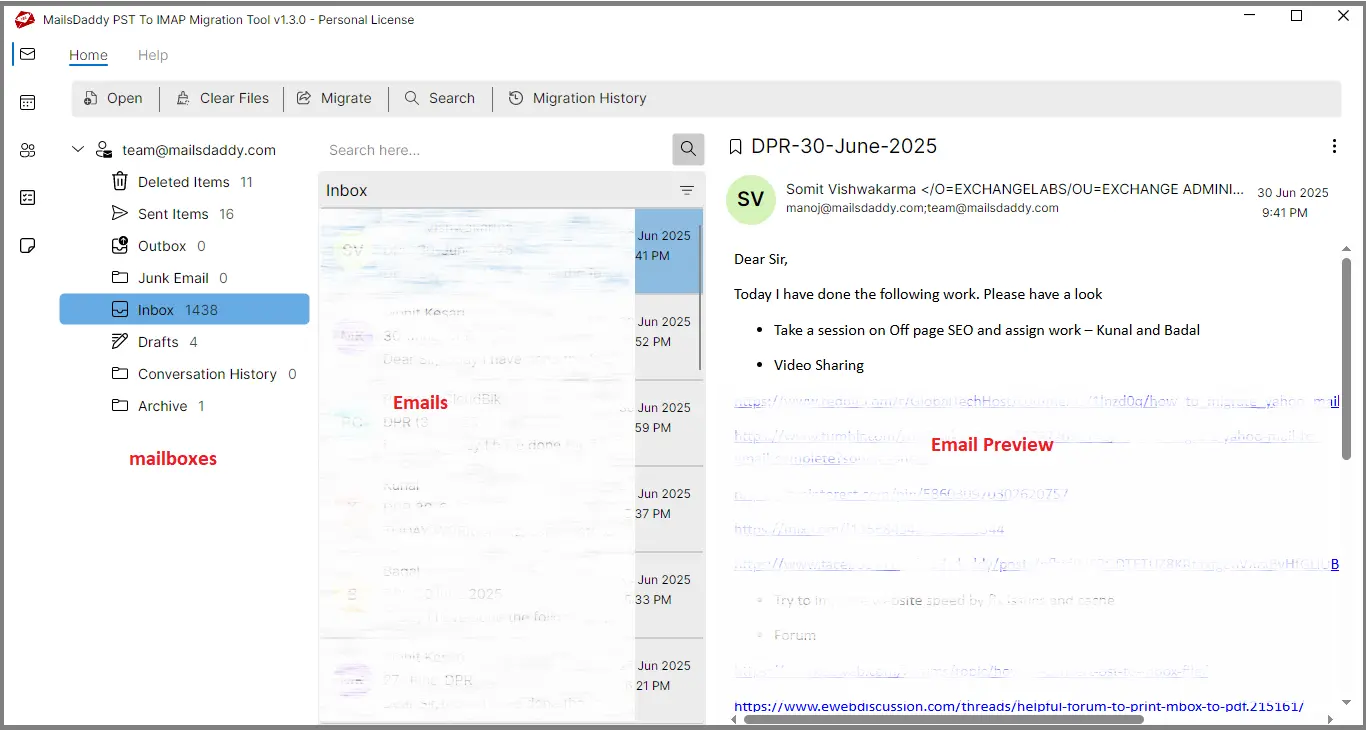
The tool includes a built-in preview panel that displays the entire PST emails and attachment to verify all data before beginning the Zoho Mail migration process.
Users can add and migrate multiple PST files at once, ensuring all emails, folders, and attachments transfer accurately. This makes large-scale migrations faster, more efficient, and fully preserves the original mailbox data.
The tool preserves the original PST folder structure during migration, ensuring every email, subfolder, and organized layout remains intact, providing a seamless and familiar mailbox structure inside Zoho Mail.
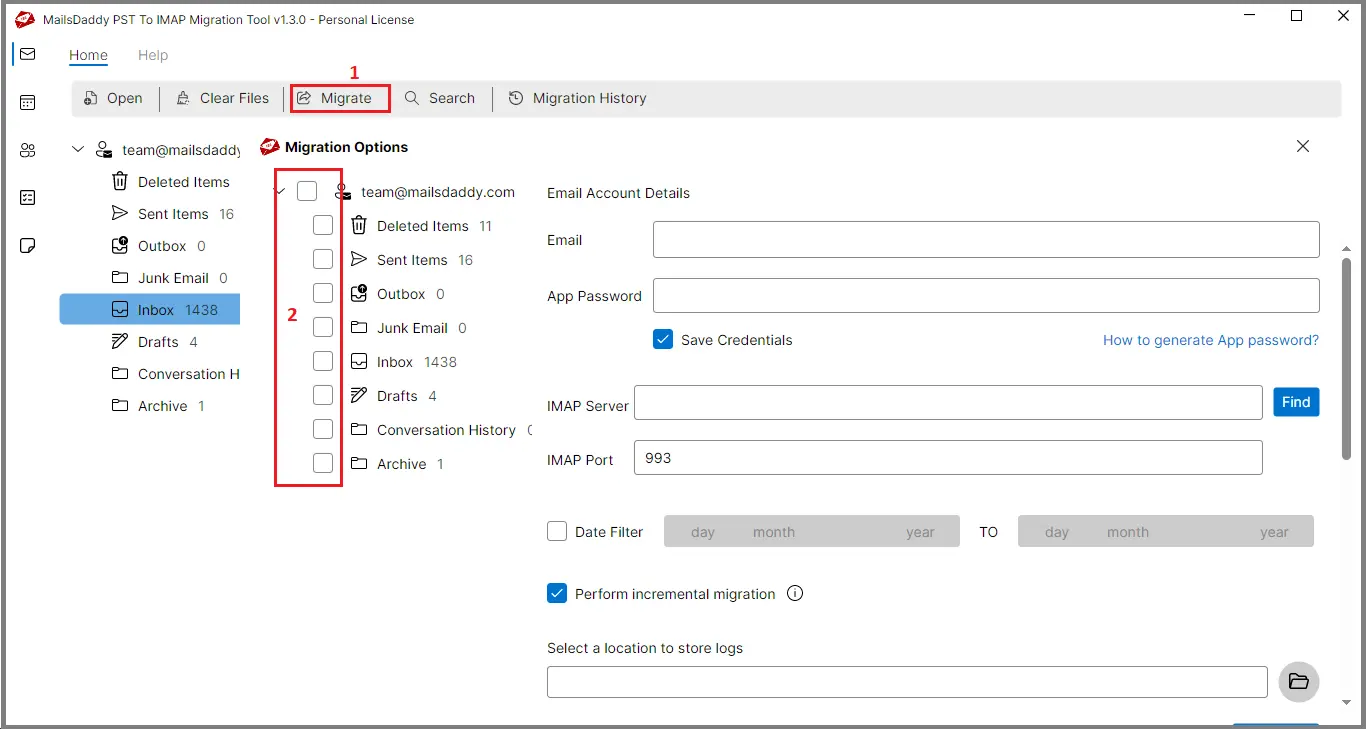
Users can choose specific PST folders for migration, so only the selected data is exported. This makes the process faster and saves time by skipping unwanted emails and folders.
All original email properties, including formatting, headers, metadata like To, From, CC, BCC, and attachments, are fully preserved. Emails appear in Zoho Mail exactly as they were stored in the PST file.
Advanced filtering options like From, Subject, and Date help users locate important emails. Only chosen messages are migrated to Zoho Mail, making the process faster and reducing unnecessary data transfer.
The software automatically scans and moves all emails with their attachments. Every document, file, and media item stays safe and unchanged, ensuring nothing is lost during the transfer to Zoho Mail.
The tool supports ANSI, Unicode, IMAP, and password-protected PST files without requiring the password. Users can migrate any Outlook PST type to Zoho Mail safely and without risk of data loss.

Users can import PST files of any size without limits. Large or multiple PST files migrate easily to Zoho Mail, ensuring freedom from size restrictions and smooth handling of extensive mailbox data.
A detailed log report is generated for the entire migration, helping users track successfully migrated emails and folders. This file ensures full reliability and accuracy throughout the PST to Zoho Mail process.
The tool works seamlessly on all major Windows versions, including Windows 11, 10, 8.1, 8, and Vista. It guarantees a smooth, stable PST-to-Zoho Mail migration without any compatibility issues.
Emails: The tool allows secure, error-free migration of PST emails to Zoho Mail. All email messages are imported while retaining their original metadata properties. Users can ensure a complete and accurate email transfer every time.
Attachments: The tool migrates emails along with all attachments from PST files to Zoho Mail. It preserves email formatting, metadata, and ensures no data is lost. Users can transfer complete email content safely and accurately.

The MailsDaddy PST to Zoho Mail Migration Tool is designed with a strict zero-downtime policy, ensuring that the migration process remains smooth and uninterrupted from start to finish. Unlike many other migration tools that may experience delays or downtime during the transfer, this tool guarantees that your email data is transferred without any pauses, failures, or disruptions. It’s designed to maintain full operational capability throughout the process, meaning your email communications remain unaffected. By adhering to the highest standards of reliability and compliance, MailsDaddy ensures that every migration is completed securely and efficiently, providing a hassle-free, stable experience for all users. .
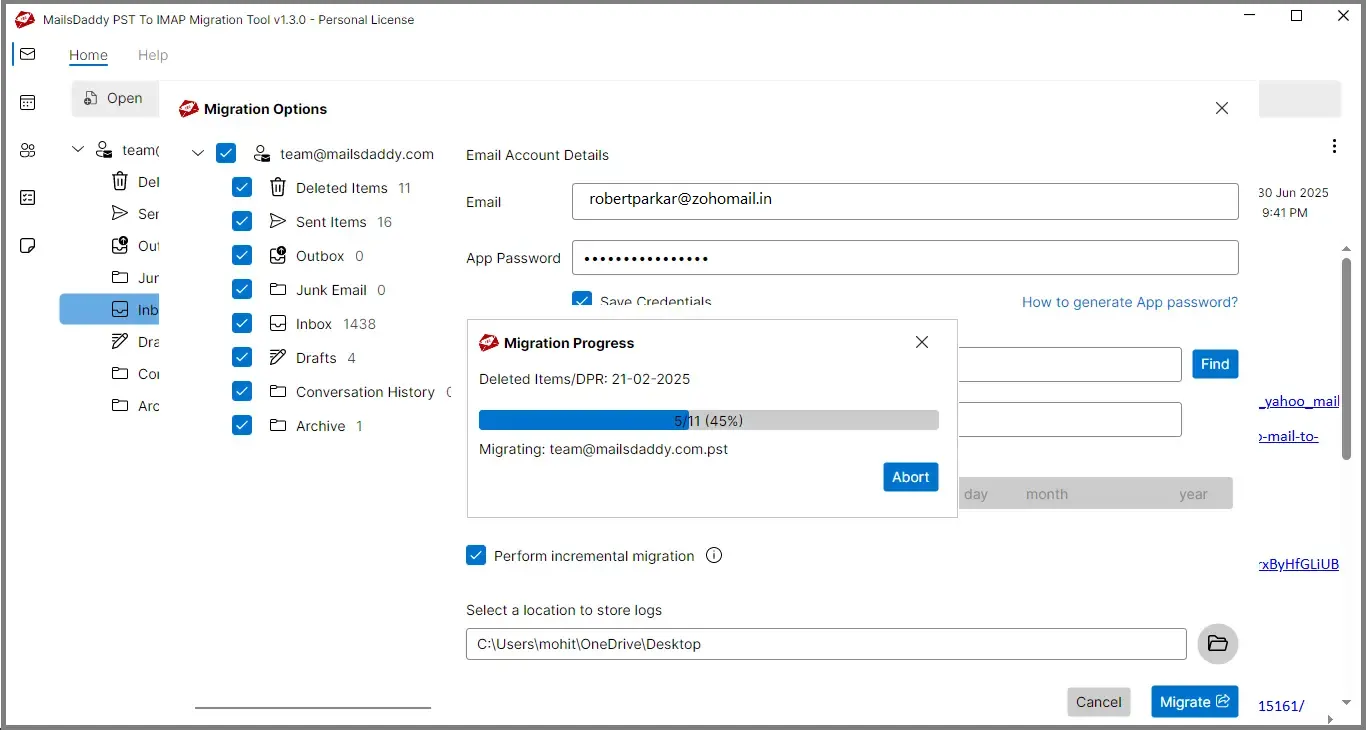
One of the standout features of this tool is the Migration History option, which allows users to track every aspect of the migration in real time. With this feature, you can easily monitor which emails have been successfully migrated, which ones were skipped, and which are still pending. In case there are any migration errors or failed transfers due to server issues, connection errors, or any other problems, you can identify and resolve the issue quickly by reattempting the failed emails without needing to restart the entire process.
This ensures that no data is left behind and offers complete control and visibility over the entire migration process, making it reliable and hassle-free.


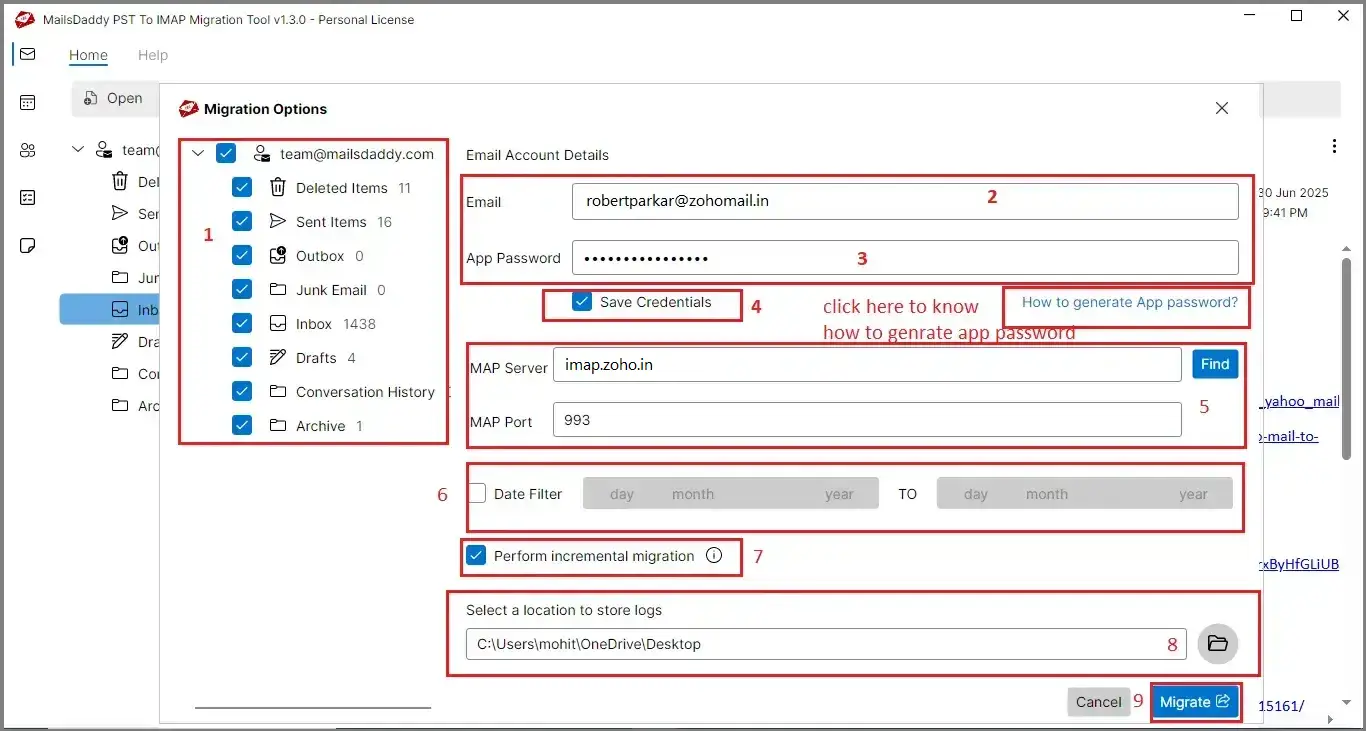
To ensure a secure and smooth migration from your PST file to Zoho Mail, it is essential to generate an App Password for your Zohomail account. This app password serves as a key that enables the MailsDaddy tool to securely connect to your Zoho account, bypassing any security restrictions or two-factor authentication prompts. By using this password, users can be assured that their data is handled safely throughout the migration process. Click blow to know how to generate the app password in Zoho.
At the MailsDaddy organization, we provide our 100% efforts to help and assist our clients to remove the burden of the technical process to migrate PST file to Zoho Mail file format with the quality based data recovery software.
Due to some reasons, I needed to migrate my data from Microsoft Outlook to Zohomail. I was looking for a solution to help with this, and eventually, I found MailsDaddy Outlook PST to Zoho Mail. This tool made the process of migrate PST to Zoho Mail incredibly easy, with just a few simple steps to securely and safely migrate my data. Thank you, MailsDaddy!

I recently needed to transfer my emails and data from Microsoft Outlook to Zohomail but I am not aware about how to import PST to Zohomail. After some research, I found MailsDaddy Outlook PST to Zoho Mail, and it turned out to be exactly what I needed. Highly recommended!!

Migrate Outlook PST to Zohomail with MailsDaddy PST to Zoho Mail Converter. Import the PST file, add Zoho credentials, apply an optional date filter, and click migrate to complete the process quickly
Yes, the MailsDaddy PST to Zoho Mail tool is compatible with single and multiple PST file at the same time.
Yes, the software is capable of maintain folder structure even a bundle of folder and subfolders available in PST file.
Yes, you can use the automated converter tool has an in-built feature where the user migrates the selected folders.
The MailsDaddy PST to Zoho Mail tool is made with an advanced algorithm, which can read and migrate the data from a password-protected PST file.
Yes, the email attachments also migrated with the help of this advanced automated converter tool.
No, there is no size limit is implemented if we use the MailsDaddy PST to Zoho Mail tool to import and export the PST file.
After every migration, a detailed log file has been created where all the mails and attachments are mentioned, including failed and successful.
The MailsDaddy PST to Zoho Mail software includes a mail search window that allows users to filter emails using various parameters and upload them to their Zoho account.


We're committed to providing you with the best support experience. MailsDaddy values its customers, and that's why our team is available 24/7 to assist you whenever you need help.
Try the PST to Zoho Mail migration tool for free or choose the right license to enjoy fast, smooth, and secure data migration. The trial version lets you import up to 20 items per folder from PST to Zohomail. To migrate your entire mailbox without any limitations, please consider upgrading to the full license.If you need any assistance, we're always here to help.